Why Automating the Wrong Task Makes Your Practice's Leaks Worse
A monthly "we miss you" blast to every lapsed patient is automation aimed at the wrong task. Automating the overdue list instead is worth an estimated $360,000 in lifetime value at a 2,400-patient med spa.

Bill Eisenhauer
March 24, 2026 · 10 min read
Automating the wrong task doesn’t fix a leak. It makes the leak faster. The most common version in a med spa is the monthly “we miss you, 20% off” email sent to every lapsed patient, which discounts people who would have come back anyway and misses the ones who are actually overdue. Point the same automation at the right task, a list of patients past their treatment cadence, and a practice with about 800 dormant patients has roughly $240,000 to $480,000 in lifetime value to recover (estimate: 800 × 10–20% × $3,000).
At a glance
- A $2 million practice bought three “AI” tools in one quarter for about $600 a month. All three were effectively dead within 60 days, because none of them was pointed at the practice’s biggest leak.
- Automation scales whatever you aim it at. A blast to the whole list scales a discount. A trigger keyed to each patient’s cadence scales a clinical reminder.
- The right task is almost always follow-up: the overdue list, the rebooking nudge, the consult that never heard back. It’s repetitive, rule-shaped and the first thing to fall off a busy front desk.
- About 800 dormant patients × 15% reactivated × $3,000 comes to roughly $360,000 in lifetime value (estimate), at a cost of $20 to $60 per patient to reach.
Key takeaways
- Start from the drainage, not the excitement. The tool the conference demo sells is rarely aimed at your most expensive leak. Measure the leak first, then choose what to automate.
- Sort every recurring task before you automate it. Creating, sorting, watching and keeping records current can be automated. Clinical judgment, pricing and the conversation in the chair stay human.
- Automating an unsegmented process makes it worse at scale. A discount blast to every lapsed patient trains your best patients to wait for a sale. A cadence-keyed reminder tells each one the truth about their own result.
- Check this week: can you pull a list of every patient more than two weeks past their usual interval for tox or filler? If it takes more than one query, that list is the task to fix before you automate anything.
- Take the free diagnostic → It shows which leak is largest in your practice, which is where any automation belongs first.
What happens when a med spa automates the wrong task?
A four-injector practice doing a little over $2 million a year, described in The Med Spa Money Map, bought three tools in a single quarter: an AI receptionist, an AI marketing platform and a review tool. Together they cost about $600 a month. Within 60 days all three were effectively dead.
Each one worked as advertised, and each one was pointed at the wrong thing. The receptionist answered calls but couldn’t see the schedule, so it booked patients into slots that didn’t exist. The marketing platform sent the same “we miss you” email to the patient three weeks overdue for tox and the patient who’d been in last Tuesday. The review tool asked for feedback from patients the practice had already lost.
Meanwhile the leaks that were actually draining the practice sat untouched. When the numbers were finally measured, prebook was under 40% and the GLP-1 program was tracking the industry attrition curve toward roughly half of patients gone within a year. Those two leaks were worth an estimated six figures or more. None of the three tools touched either one.
The lesson isn’t that automation fails. It’s that automation is an amplifier. Aim it at a good process and you get more of a good process. Aim it at a guess and you get the guess, faster, to every patient on the list.
Why does the “we miss you” blast make reactivation worse?
The blast feels productive. It’s easy to set up, it goes to everyone and it produces a few bookings every month. Look at what it actually automates, though.
It automates a discount. A win-back built on price tells the patient your real price is the sale price. The book’s figure is blunt: 73% of patients who come in on a discount never return at full price. The patients most likely to respond to “20% off” are the ones who were coming back anyway, so you’ve marked down revenue you already had. I cover the margin side of this in Discounting Is Costing Your Practice More Than the Discount.
It automates the wrong timing. A monthly send ignores the thing that actually decides whether a patient comes back: where they are against their own treatment cadence. Neuromodulator results fade in three to four months, filler in six to twelve, facials and microneedling run monthly to quarterly. A tox patient two weeks overdue is one reminder from rebooking. A filler patient fourteen months out needs a real win-back effort. The blast treats them the same.
It automates noise. Sending the same message to the whole list, month after month, trains patients to ignore you and gives spam filters a reason to learn your address. By the time a patient is genuinely overdue, your message is the one they’ve stopped opening.
This is the patient reactivation leak in its automated form. The list is being contacted, so it feels handled. It isn’t being worked.
Which tasks in a med spa are safe to automate?
Before automating anything, sort the recurring work in the practice into five buckets. The sorting takes an afternoon.
| Task type | Med spa examples | Automate? |
|---|---|---|
| Create a draft | Consult follow-up messages, a patient’s pre-visit instructions, a first pass at the weekly numbers | Yes, with a person reviewing anything a patient sees |
| Sort and route | New inquiries by treatment, after-hours messages into one queue, lapsed patients by how overdue they are | Yes |
| Watch and flag | A tox patient past week 16 with nothing booked, a GLP-1 patient who missed a refill, a no-show with no reschedule | Yes, and this is where most of the money is |
| Keep current | Due dates after every visit, reminder schedules, the waitlist | Yes |
| Judgment | Treatment plans, pricing, which patient gets a courtesy touch-up, what to say to an unhappy patient | No. Automate the information that feeds the decision, and leave the decision with a person |
The expensive mistakes land in the last row. A system that decides discounts on its own, or picks which unhappy patient deserves a call, produces confident answers to questions that need someone who knows the patient. Have the system surface the three patients who look unhappy and let the provider decide what to do.
How do you pick the first task to automate?
Four questions, in order.
Is this the most expensive leak? Start from the dollars. For most practices the answer is follow-up: the overdue list, rebooking at checkout, the consult that didn’t book. Those leaks can run to an estimated six figures a year, and nobody’s job is to close them.
Is the process the same every time? If one coordinator rebooks at checkout and another says “we’ll call you,” automating the reminder won’t fix the checkout. Write the process down first. I make the case for that in the one process worth documenting.
What does it cost when it’s wrong? A reminder sent a week early costs almost nothing. A discount sent to your best patients costs margin on every visit they would have paid in full. The higher the cost of a mistake, the more a person should approve before anything goes out.
How often does it happen? A task done 50 times a week earns automation. A task done once a quarter doesn’t. Follow-up happens every day, for every patient, which is exactly why it falls apart by hand.
What is the reactivation list actually worth?
Take the example practice in The Med Spa Money Map: Lumen Aesthetics, about $1.8 million a year, 2,400 active patients and roughly 800 dormant ones. Reactivation campaigns worked by treatment cadence typically bring back 10% to 20% of a dormant list on a first pass.
800 dormant × 15% × $3,000 = $360,000 in lifetime value (estimate)
At the ends of the range, that’s roughly $240,000 to $480,000. Reaching each patient costs $20 to $60, against $100 or more to acquire a new one.
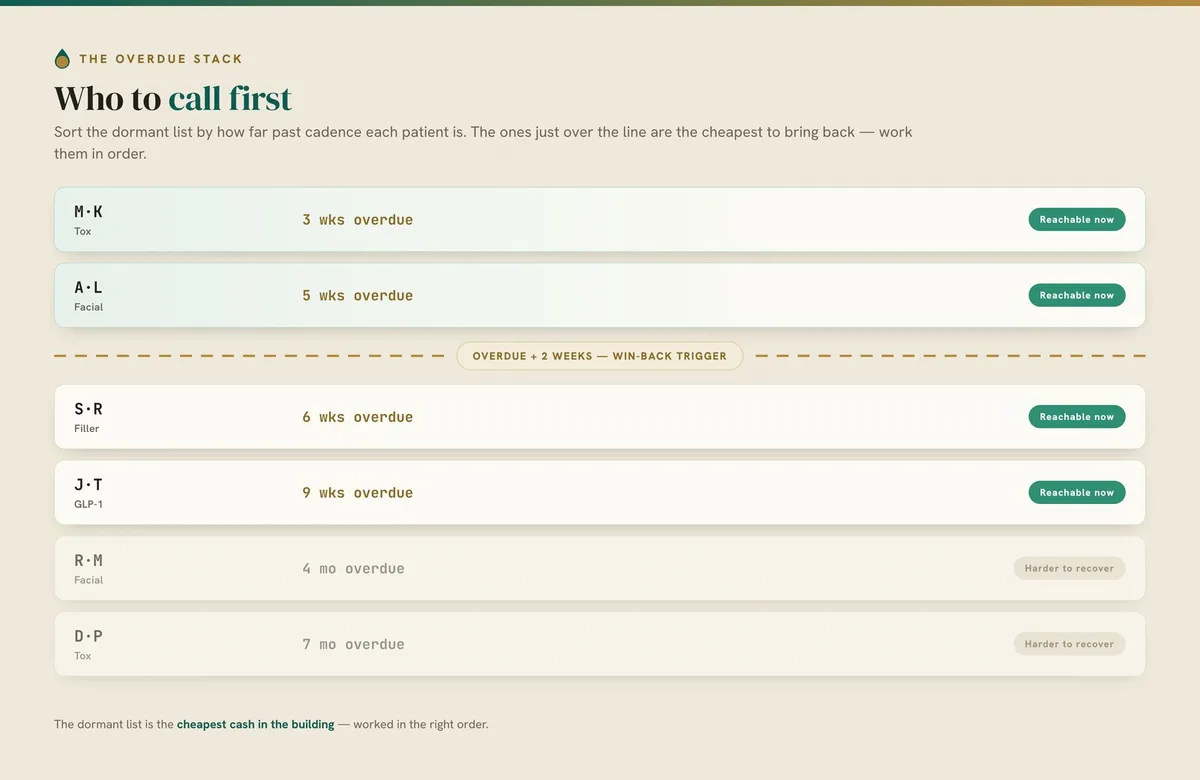
One caution on the math. Reactivation shares a root cause with the rebooking gap and the first-visit cliff: nobody is tracking each patient’s treatment cadence. When you fix that loop, count each recovered patient once, not once per leak.
How do you fix it?
Start by hand. The automation comes after the process works.
Week 1: Build the list. Pull every patient whose last visit is more than two weeks past the usual interval for that treatment. Sort by how overdue they are. If your PMS can’t do this in one report, do it in a spreadsheet for tox and filler only.
Week 2: Work the top by hand. Take the ten most recently overdue patients and reach out personally with a clinical message, not a coupon: “You’re right about due for your tox. Want me to hold a time next week?” Track who books and who shows.
Week 3: Turn off the blast. Stop the monthly discount email to the whole list. Replace it with a three-message win-back that fires at overdue plus two weeks: a genuine check-in, a note about their result, then an easy offer of two specific times.
Week 4: Automate what worked. Now make the trigger automatic: due dates set at every checkout, the overdue report running weekly, the sequence firing on its own. Measure sends, bookings and shows, not opens.
What does AI actually do for reactivation?
Most of the week 4 work isn’t AI. Due dates, a weekly overdue report and a scheduled message sequence are settings in the PMS and texting tools most practices already pay for. Say so to anyone selling you otherwise.
The judgment work starts after that, and there are two places where it pays. One is learning each patient’s own rhythm: the patient who always rebooks at week 18 shouldn’t be flagged at week 15, and the one who slips at month four should be nudged sooner. Across 2,400 patients, that’s pattern-matching nobody at the front desk has time to do. The other is drafting each message from the patient’s chart, so the note mentions her provider and her last treatment rather than “valued patient.” AI doesn’t replace the win-back. It makes sure each patient gets a message timed to her own result.
FAQ
What should a med spa automate first?
Automate the follow-up loop first: the overdue-patient list, the rebooking reminder and the consult that didn’t book. These are repetitive, rule-shaped tasks that fall off a busy front desk, and they sit on the practice’s most expensive leaks. Receptionist bots and review tools can wait until those loops are closed.
Why doesn’t a monthly “we miss you” email work?
It goes to everyone at once, so it ignores where each patient is against her own treatment cadence, and it usually carries a discount. Patients who were coming back anyway take the discount, and the ones who are truly overdue have learned to ignore the email. A message timed to about two weeks past each patient’s due date, framed as maintenance, does better without the markdown.
How many lapsed patients can a med spa realistically win back?
A first campaign worked by treatment cadence typically reactivates 10% to 20% of a dormant list. At about 800 dormant patients and a conservative $3,000 lifetime value, that’s roughly $240,000 to $480,000 in lifetime value (estimate). Confirm your own dormant count from your PMS before you plan on it.
Should automation ever decide on discounts or treatment plans?
No. Pricing, treatment plans and how to handle an unhappy patient need someone who knows the patient and the practice. Automation can gather the history, flag the patient and draft options, but a provider or the owner makes the call. Ask your medical director where the line sits for anything clinical.
Is it worth automating a task the front desk only does occasionally?
Usually not. Multiply how often it happens by how long it takes and by what a mistake costs. Tasks done dozens of times a week, like rebooking reminders and overdue checks, earn automation. A quarterly report can stay manual.
A note on these figures: the 10–20% reactivation range, the $20–$60 cost to reach a lapsed patient and the 73% discount figure are industry ranges cited in The Med Spa Money Map. The four-injector practice and Lumen Aesthetics come from the book; Lumen is its example practice, and the $360,000 is illustrative math on its numbers. All dollar figures are estimates. Confirm your dormant count and reactivation rate against your own PMS data before relying on them.
Written by Bill Eisenhauer, Founder of Alchemy Inside.
Workflow & Automation
How many hours is your team losing to manual work?
This article explored one category. The free diagnostic scores all six — and gives you a dollar estimate in 90 seconds.
Take the Free Diagnostic